- Oracle's NetSuite Connector, the product formerly known as FarApp, is the usual starting point. Its Shopify app syncs products, pricing, inventory, sales orders and fulfillments, with plans for B2C, B2B and Shopify POS.
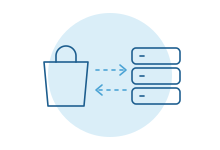
- Orders and refunds move from the store into NetSuite. Shipments and stock levels move back.
- Refunds sync in one direction per store, and an exchange syncs only its refund, not the return record.
- The gaps sit at the edges: bundles, partial shipments, wholesale terms, unusual returns, and several stores feeding several subsidiaries.
- Start with the connector. Build only the piece it leaves behind.
The Monday error queue
The connector is running. Most weekend orders landed in NetSuite overnight. Then there are the eleven that didn't.
One has a bundle NetSuite doesn't recognize. One is a wholesale order that needs net terms. Two were partly refunded before they shipped. Someone in operations works through them one by one, and the warehouse waits.
That is the normal shape of a Shopify and NetSuite connection. The common path is automatic. The exceptions are where the hours go.
What Oracle's connector handles
Oracle sells NetSuite Connector for storefronts, marketplaces and third-party warehouses. Its Shopify App Store listing, published by Oracle NetSuite, says it syncs product, pricing, inventory, sales order and fulfillment data between the two systems.
Oracle's help center describes the flow in plain terms:
- Orders and refunds move from the store into NetSuite.
- Fulfillments move from NetSuite back to the store, so customers see shipping details.
- Products, prices and quantities move from NetSuite out to the store, on a schedule or close to real time depending on the plan.
The listing also names B2B order sync, B2B customer sync, invoice posting, coupon and gift certificate sync, and stock tracked across several warehouse locations. Plans are split into B2C, B2B and POS options, so check which one covers what you sell.
For a store selling standard products to consumers from one or two warehouses, that is often most of the job.
Where it stops
Oracle's own documentation sets some of the limits. Others show up in daily work. These are the ones teams hit most:
- Refunds go one way per store. Oracle says you can't sync refunds both ways for a single account under one connector, and recommends doing Shopify refunds in NetSuite and syncing them out.
- Exchanges are half-synced. When an exchange creates a refund, the refund syncs. Oracle notes the return records don't.
- Cancellations need care. By default, Shopify refunds a paid order when it is canceled. Oracle documents a setting to stop that when cancellations come from NetSuite.
- Bundles and kits. A bundle sold as one product in Shopify may be a kit, an assembly or separate items in NetSuite. Check how each one maps before launch.
- Partial shipments and backorders. Check whether split fulfillments from several locations show up in Shopify the way your customers expect.
- Several stores, several subsidiaries. Expansion stores for other countries or brands often belong to different NetSuite subsidiaries, currencies and tax setups. Check how each store is routed.
- Wholesale rules. Price levels, credit holds, purchase order numbers and approval before release are where B2B orders tend to stall.
- Your own fields. A gift message, a sales channel tag or a custom attribute your warehouse relies on may need extra mapping, or may not carry at all.
None of this means the connector is the wrong choice. It means the edges need an owner.
Your three options
Use the connector as it comes. This makes sense when your catalog is straightforward, refunds follow one routine and a person can clear a short error list each morning. It is maintained by Oracle, and that is worth a lot.
Use a third-party connector or integration platform. Several companies sell prebuilt Shopify and NetSuite flows, and general integration platforms offer templates you can adjust. These suit teams that want more control over mapping and a visual tool their admin can change. Compare how each handles your specific exceptions, not just the feature list.
Build a custom connection for the part that's yours. This suits companies whose order rules are the business: a wholesale approval step, a routing rule across warehouses, a returns process with its own logic. Our guide to off-the-shelf automation vs a custom integration covers how to tell when you've crossed that line.
The answer is often a mix. Keep the connector for the everyday orders and build only the piece it can't do.
What a custom connection usually adds
The useful additions are rarely about speed. They are about judgment that currently lives in someone's head.
- Wholesale orders that wait for credit approval in NetSuite before they reach the warehouse, with the sales rep told why.
- Returns handled as one flow, so the refund, the restock and the customer note stay together.
- Bundles broken into the right items for picking, while finance still sees one sale.
- A clear daily list of what didn't sync and why, written for the person who fixes it, not for a developer.
- Orders from several stores routed to the right subsidiary, location and currency without anyone choosing by hand.
Each one replaces a manual step someone does today. If nobody is doing the step by hand, it probably doesn't need building. Our manual data entry page shows the kind of work that usually pays off first.
Who owns the access
Any connection should belong to your company. Your Shopify admin installs the app on your store. Your NetSuite administrator creates the integration record and a role with only the permissions it needs.
A developer working for you builds under that access. They don't need a store owner login, and they shouldn't hold the keys after the work ends. For how Shopify treats an app built for one store versus one sold to many, see when an integration needs the vendor's approval.
What most guides miss
Decide where each record is born. Products usually start in NetSuite. Orders start in Shopify. Refunds should start in one place per store. Write those rules down before anyone touches mapping. Most sync problems are really arguments about which system is right.
Test with your worst week. Run the connection against a holiday weekend of real orders in a sandbox, not ten tidy test orders. The exceptions only show up in volume.
Someone has to own the error list. Pick a person, give them a daily time to check it and tell them who to call. An unread error queue is how stock goes wrong for a month.
How we do it
We start with a free intro call and a look at what actually breaks today. Then we work alongside your Shopify and NetSuite admins, keep the connector where it does the job, and build only the piece it leaves behind. More detail lives on our Shopify and NetSuite pages.